Flipper Zero Alternatives Compared: Flipper Zero Vs T-Embed CC1101 Plus Vs HackRF One


Portable multi-tools have become popular among hackers, security researchers, and electronics makers because they place several testing functions inside one compact device. Instead of carrying separate tools for radio signals, NFC tags, infrared controls, and hardware connections, users can study multiple technologies from a single interface.
Open-source firmware, active developer communities, and affordable ESP32 hardware have also made these tools easier to customize. Their capabilities are powerful, but every test must remain limited to equipment the user owns or has explicit permission to operate.
Flipper Zero, the LILYGO T-Embed CC1101 Plus, and HackRF One with a PortaPack can all fit into a portable electronics kit, but they solve different problems.
Flipper Zero is a polished protocol-focused multi-tool,
the T-Embed is a lower-cost ESP32 platform for custom firmware, and
HackRF One is a wideband software-defined radio for deeper signal analysis.
The best choice depends on whether you value convenience, customization, or RF range.
Key Takeaways
Choose Flipper Zero if you want the most complete, beginner-friendly tool for Sub-GHz, NFC, 125 kHz RFID, infrared, iButton, and GPIO testing.
Choose the T-Embed CC1101 Plus if you want an affordable ESP32 Flipper Zero alternative with Wi-Fi, Bluetooth, Sub-GHz, NFC, infrared, and 2.4 GHz hardware that you can program yourself.
Choose HackRF One with a PortaPack if your priority is wideband RF analysis from 1 MHz to 6 GHz rather than ready-made NFC, RFID, or infrared functions.
These tools are not interchangeable: Flipper Zero and T-Embed work mainly through dedicated protocol hardware, while HackRF captures and generates raw radio signals as a software-defined radio.
What Are These Three Tools?
Flipper Zero is a portable electronics and hardware security multi-tool. It combines dedicated radios and interfaces for Sub-GHz signals, 13.56 MHz NFC, 125 kHz RFID, infrared, iButton, Bluetooth Low Energy, USB, and GPIO expansion.
The LILYGO T-Embed CC1101 Plus is an ESP32-S3 development device with a color screen, CC1101 Sub-GHz transceiver, PN532 NFC module, infrared hardware, Wi-Fi, Bluetooth, and an added nRF24L01 module for 2.4 GHz experimentation.
HackRF One is a software-defined radio that can receive or transmit between 1 MHz and 6 GHz. A compatible PortaPack adds a display and physical controls, allowing many functions to run without a computer.
All three are useful for DIY electronics and authorized wireless testing. They differ more in architecture and workflow than their similar handheld appearance suggests.
Flipper Zero Vs T-Embed Vs HackRF: The Main Differences
Feature | Flipper Zero | T-Embed CC1101 Plus | HackRF One + PortaPack |
Main platform | STM32WB55 handheld multi-tool | ESP32-S3 development device | Wideband software-defined radio |
Radio approach | Dedicated protocol-focused hardware | Dedicated radios controlled by custom firmware | Raw RF capture and generation |
Main RF coverage | Regional Sub-GHz bands | CC1101 Sub-GHz bands plus nRF24 2.4 GHz | 1 MHz to 6 GHz |
NFC | Built-in 13.56 MHz NFC | Built-in PN532 NFC | Not built in |
125 kHz RFID | Built in | Not built in | Not built in |
Infrared | Transmit and receive | Transmit and receive | Not built in |
Wi-Fi | Requires an add-on | Built-in 2.4 GHz Wi-Fi | Not built in |
Bluetooth | Bluetooth Low Energy | Bluetooth Low Energy | Not built in |
Display | 1.4-inch monochrome LCD | 1.9-inch color IPS display | PortaPack color display |
Storage | microSD | TF/microSD | microSD with compatible PortaPack |
Typical learning curve | Lowest | Moderate | Highest |
Relative cost | Mid-range | Usually the lowest | Usually the highest |
Best starting use | General hardware and protocol testing | Custom ESP32 security and electronics projects | RF spectrum analysis and SDR learning |

Hardware alone does not guarantee support for every protocol. Firmware, regional restrictions, antennas, radio configuration, and the target device all affect what each tool can do.
Flipper Zero: The Most Complete All-Rounder
Flipper Zero is the easiest of the three to pick up and use. Its directional pad, organized applications, desktop and mobile tools, extensive documentation, and active software ecosystem make it feel like a finished product rather than a development board.
Its main advantage is integration. According to the official Flipper Zero specifications, the device includes a CC1101 Sub-GHz transceiver, a 13.56 MHz NFC system, 125 kHz RFID hardware, infrared transmit and receive, iButton contacts, Bluetooth Low Energy, USB, and 13 user-accessible GPIO pins. These features cover many common electronics-lab tasks without requiring external modules.

Flipper Zero is particularly practical for organizing and testing compatible remotes (garage gates, entrance doors), tags, infrared controls (Air Conditioners, TVs), sensors, and your own prototype hardware. Instead of writing an application before every test, you can often select a built-in function, capture information, save it, and inspect the result.
The 1.4-inch monochrome screen is modest, but it helps the battery last. Flipper documents a 2,100 mAh battery with up to 28 days of battery life, although actual runtime depends on radio use, screen time, applications, and connected modules. A microSD card stores databases, applications, and saved files.
Where Flipper Zero Is Strongest
Ready-to-use applications for several hardware interfaces
Built-in 125 kHz RFID, which the other two options lack
Compact enclosure and efficient battery operation
Clear documentation and a large user community
GPIO expansion for external sensors, radios, and development boards
A consistent interface across different tools
Where Flipper Zero Is Limited
Flipper Zero is not a wideband SDR. Its CC1101 radio works in defined Sub-GHz bands that vary by region, and its workflow is built around supported modulations and protocols. It cannot replace HackRF One for broad spectrum viewing, raw IQ recording, or experiments across several gigahertz.
It also lacks built-in Wi-Fi. Flipper sells a separate Wi-Fi Developer Board, and community modules can add other hardware, but those additions increase cost and size. Its 64 MHz application processor and monochrome display are also less suitable than an ESP32-S3 for graphics-heavy custom interfaces or Wi-Fi-first projects.
Choose Flipper Zero when you want one polished device for learning, electronics troubleshooting, and authorized protocol testing. It offers the strongest balance of portability, capability, and ease of use.
T-Embed CC1101 Plus: The ESP32 Flipper Zero Alternative
The T-Embed CC1101 Plus takes a different approach. It is a development platform first, which makes it attractive to makers who want to change the firmware, build their own menus, connect web services, or integrate the device into a larger ESP32 project.
The LILYGO documentation lists an ESP32-S3 dual-core processor running at up to 240 MHz, 16 MB of flash, 8 MB of PSRAM, 2.4 GHz Wi-Fi, Bluetooth 5 LE, a 320 × 170 color display, a CC1101 radio, a PN532 NFC module, infrared hardware, a microSD slot, microphone, speaker, rotary encoder, and a 1,300 mAh battery.
The Plus model adds an nRF24L01 module for the 2.4 GHz ISM band.
That combination gives the T-Embed more processing power, memory, color graphics, and network connectivity than Flipper Zero. It can host richer interfaces, local web controls, Wi-Fi-connected tools, and custom Arduino or ESP-IDF applications.

The CC1101 covers 300–348 MHz, 387–464 MHz, and 779–928 MHz bands according to LILYGO. Exact legal frequencies and permitted transmit power depend on the country. The nRF24L01 adds another radio path for compatible 2.4 GHz projects, while the PN532 provides 13.56 MHz NFC hardware.
Where The T-Embed Is Strongest
Lower entry cost than the other two options in many markets
Fast ESP32-S3 processor with substantial flash and PSRAM
Built-in Wi-Fi and Bluetooth for connected projects
Color display and rotary control for custom interfaces
CC1101, PN532, infrared, and nRF24L01 hardware in one device
Familiar Arduino IDE and ESP-IDF development options
Where The T-Embed Is Limited
The T-Embed requires more setup. Its value depends heavily on the firmware you install and the functions that firmware supports. A radio or NFC chip appearing on the specification sheet does not mean every Flipper Zero feature has a finished equivalent.
It also lacks Flipper Zero’s built-in 125 kHz RFID system and iButton contacts. Firmware quality, stability, file compatibility, battery reporting, and interface design can vary between projects. Community firmware may change quickly, so documentation for one release may not match another.
The T-Embed is therefore best for someone who sees firmware installation and customization as part of the project. If you want a DIY Flipper Zero-style device and are comfortable troubleshooting libraries, pins, builds, and firmware releases, it offers excellent hardware value.
If this would be your first programmable device, start with a simpler ESP32 exercise before changing security-tool firmware. The Arduino Uno vs ESP32 beginner comparison explains the core differences in processing, wireless connectivity, voltage, and project structure.
HackRF One With PortaPack: The Portable SDR Option
HackRF One is the most technically capable radio in this comparison, but it is not a direct replacement for every Flipper Zero feature. Its strength is wideband RF access rather than a collection of dedicated NFC, RFID, and infrared interfaces.
The official HackRF One documentation specifies a 1 MHz to 6 GHz operating range, half-duplex operation, up to 20 million samples per second, and 8-bit quadrature samples. It can work with GNU Radio, SDR#, and other SDR software through a computer. A PortaPack adds a display, controls, audio hardware, and portable firmware to HackRF One.
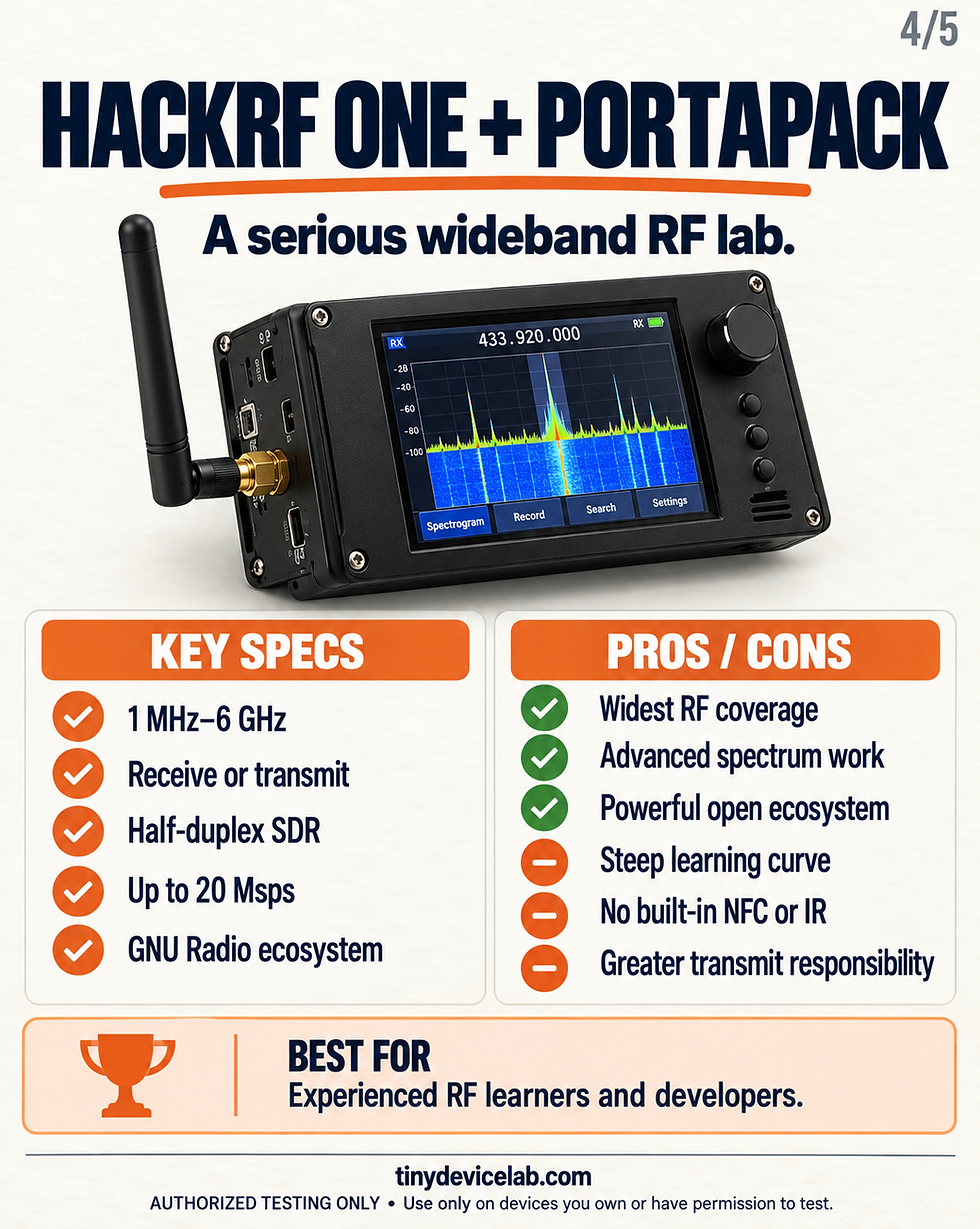
The major difference is that HackRF can work with raw radio samples. This gives an experienced user far more freedom to inspect modulation, bandwidth, timing, and spectrum behavior. It also creates a steeper learning curve because the user must understand frequencies, antennas, gain, sampling, filtering, and local transmission rules.
Where HackRF One And PortaPack Are Strongest
Far wider frequency coverage than CC1101-based devices
Raw signal capture for detailed RF analysis
Compatibility with established SDR software
Strong open-source hardware and software ecosystem
Useful for spectrum observation, receiver experiments, and radio education
Portable operation when paired with a suitable PortaPack
Where HackRF One And PortaPack Are Limited
HackRF One is half-duplex, so it cannot receive and transmit simultaneously. Its 8-bit samples are sufficient for many experiments but provide less dynamic range than higher-resolution laboratory SDRs.
It does not include NFC, 125 kHz RFID, infrared, iButton, Wi-Fi, or Bluetooth interfaces. Those are separate technologies and require other hardware. HackRF One also needs an appropriate antenna, and some projects benefit from filters or other RF accessories.
Cost and complexity are the final trade-offs. A genuine HackRF One combined with a PortaPack, enclosure, battery solution, antennas, and storage normally costs more than Flipper Zero or the T-Embed. It is the right choice when learning SDR is the goal, not when you simply want the easiest handheld multi-tool.
Dedicated Radios Vs Software-Defined Radio
This architecture difference explains most of the comparison.
Flipper Zero and the T-Embed use dedicated chips for particular frequency ranges and tasks. A CC1101 is efficient for supported Sub-GHz modulation schemes, while NFC and infrared hardware handle their own types of communication. The firmware can present these functions through clear menus because the hardware scope is defined.
HackRF One replaces that narrow scope with a wideband RF front end and digital samples. It can observe a much broader range, but it does not automatically understand what a signal means. Software or firmware must identify the modulation, bandwidth, timing, and protocol.
For beginners, protocol-focused hardware usually produces faster results. For advanced RF study, an SDR provides more visibility and control.
Software And Learning Curve
Flipper Zero has the lowest learning curve. Official firmware provides a consistent interface, while the desktop application handles updates and file management. Developers can still write applications and build GPIO modules, but programming is optional for many uses.
The T-Embed sits in the middle. You may be able to flash existing firmware and begin testing quickly, but its real advantage appears when you modify code or build your own ESP32 application. Familiarity with Arduino IDE, PlatformIO, serial logs, libraries, and board settings is valuable.
HackRF One has the highest learning curve. PortaPack firmware makes it portable, but understanding the results still requires RF fundamentals. Computer-based workflows may also involve GNU Radio flowgraphs, SDR software, drivers, command-line tools, antennas, and sample files.
Best Use Cases For Each Tool
Choose Flipper Zero For Everyday Hardware Testing
Flipper Zero is the most practical option for testing several types of everyday electronics without writing custom firmware first. Its infrared system can read and organize signals from compatible air conditioners, televisions, audio systems, projectors, and other appliances that you own. This can help consolidate several physical remotes into one portable device or confirm whether an infrared remote is transmitting correctly.
Its Sub-GHz radio can be used to examine signals from your own compatible garage-gate remote, wireless doorbell, weather sensor, alarm sensor, or remote-controlled outlet. This is most useful for identifying frequencies, testing static-code devices, and checking whether a remote is producing a signal. Modern garage gates often use rolling codes or other security measures that cannot be treated like simple static remotes and should never be bypassed.
Flipper Zero can also read supported NFC tags, 125 kHz RFID tags, and iButton keys that belong to you. Its GPIO pins support external sensors, development boards, and radio modules, making it useful for troubleshooting DIY electronics prototypes. Choose it when you want a portable tool that can move between household electronics, access-tag experiments, radio controls, and hardware projects with minimal setup.
Choose The T-Embed For Custom ESP32 Projects
The T-Embed CC1101 Plus is better when you want to design the interface and decide how every function works. Its ESP32-S3 can connect infrared controls, Sub-GHz tools, NFC functions, Wi-Fi services, Bluetooth devices, and custom menus inside one programmable project.
For example, you could build an infrared controller for your own air conditioner and add temperature readings, schedules, or a local Wi-Fi dashboard. You could also create a test bench for your own garage-gate remote, wireless doorbell, weather station, or home sensor, provided the device operates within the supported CC1101 bands and local radio regulations.
The PN532 module can work with compatible NFC tags that you own, while the nRF24L01 module supports custom 2.4 GHz electronics projects. The color display and rotary encoder are useful for building menus, viewing recorded information, selecting devices, and changing test settings without connecting a computer.
The T-Embed is particularly suitable for a DIY Flipper Zero alternative because its firmware can be changed as the project develops. Choose it when coding, debugging, and adding new functions are part of what you want to learn.
Choose HackRF One For RF And SDR Learning
HackRF One with a PortaPack is designed for broader radio analysis. It can help you observe the spectrum around your own garage remote, weather station, wireless sensor, remote-controlled outlet, prototype transmitter, or other authorized radio equipment. The spectrum view can show where a signal appears, how much bandwidth it occupies, and whether nearby interference is present.
It is also useful for comparing antennas, testing filters, examining permitted public transmissions, and confirming that your own low-power transmitter operates where expected. When connected to a computer, software such as GNU Radio can provide more detailed analysis of modulation, timing, recorded samples, and signal structure.
HackRF One is not the best tool for controlling an air conditioner because it has no built-in infrared hardware. It also lacks Flipper Zero’s NFC, 125 kHz RFID, and iButton systems. Its purpose is to provide broad visibility into radio activity rather than finished applications for household controls.
Choose HackRF One when you want to understand how radio signals work at a deeper level. Begin with receive-only observation and controlled laboratory testing before considering transmission.
All examples in this section apply only to devices, remotes, tags, networks, radio signals, and equipment you own or have explicit permission to test. Never attempt to manipulate another person’s garage gate, air conditioner, access system, computer, remote, or wireless device.
Which Tool Offers The Best Value?
The T-Embed offers the most hardware per dollar if you are prepared to configure and debug it. Its ESP32-S3, color display, Wi-Fi, Bluetooth, Sub-GHz, NFC, infrared, and 2.4 GHz radio create a capable base for custom projects.
Flipper Zero costs more but includes a better-integrated experience. You are paying for the enclosure, battery management, interface, firmware, documentation, compatibility testing, and ecosystem—not only the component list.
HackRF One with a PortaPack is usually the largest investment. Its value comes from frequency coverage and SDR flexibility. Buying it only to reproduce basic infrared or NFC tasks would be inefficient because those functions are not built in.
Which Wireless Multi-Tool Should You Choose?
Choose Flipper Zero if you want the most polished all-rounder. It is the easiest to learn, covers the widest selection of built-in non-SDR interfaces, and requires the least setup.
Choose the T-Embed CC1101 Plus if you want an affordable ESP32 Flipper Zero alternative and enjoy building the software as much as using the device. It provides strong hardware, but you are responsible for more of the final experience.
Choose HackRF One with a PortaPack if your main interest is wideband radio. It has the broadest RF capability, but it also demands the most knowledge, supporting equipment, and care.
There is no universal winner. Flipper Zero leads in usability, the T-Embed leads in DIY flexibility and value, and HackRF One leads in RF depth.
Use These Tools Responsibly
Wireless testing hardware can interact with access systems, remotes, tags, computers, sensors, and radio equipment. That capability does not provide permission to inspect or control someone else’s device.
Test only with devices, accounts, networks, tags, radio signals, and equipment that you own or have explicit permission to operate. Never attempt to manipulate another person’s device, copy their credentials, intercept private communications, bypass access controls, disrupt services, or transmit on restricted frequencies without authorization.
Radio regulations vary by country and frequency band. Confirm the applicable power limits, licensing requirements, permitted frequencies, and manufacturer instructions before transmitting. If you are unsure whether a test is legal or authorized, do not proceed.
Frequently Asked Questions
Is The T-Embed CC1101 Plus Better Than Flipper Zero?
It has a faster processor, more memory, a color display, built-in Wi-Fi, and an nRF24L01 radio. Flipper Zero has more polished software, built-in 125 kHz RFID, iButton support, stronger documentation, and a simpler user experience. The T-Embed is better for custom development; Flipper Zero is better for ready-to-use testing.
Can HackRF One Replace Flipper Zero?
Not completely. HackRF One covers a much wider radio range and can capture raw RF samples, but it does not include Flipper Zero’s NFC, 125 kHz RFID, infrared, iButton, or GPIO-focused applications. The two devices serve different roles.
Which Flipper Zero Alternative Is Best For Beginners?
The T-Embed CC1101 Plus is a strong lower-cost alternative for beginners who already understand basic ESP32 development. A complete beginner who wants working applications with minimal setup will probably find Flipper Zero easier.
Does Flipper Zero Have Wi-Fi?
No Wi-Fi radio is built into the main device. Wi-Fi can be added through the official Wi-Fi Developer Board or compatible third-party GPIO modules.
Can The T-Embed Read 125 kHz RFID Tags?
No. Its PN532 module handles 13.56 MHz NFC and high-frequency RFID functions. It does not include the separate low-frequency 125 kHz RFID hardware found in Flipper Zero.
Is HackRF One Legal To Own?
Ownership rules vary by country, but the more important issue is how the radio is used. Receiving protected communications, interfering with services, or transmitting outside permitted bands or power levels can be illegal. Follow local laws and operate only in authorized test environments.
Which Device Is Best For A DIY Electronics Lab?
Flipper Zero is the best general handheld tool, the T-Embed is the best programmable project platform, and HackRF One is the best wideband RF learning instrument. A lab focused on several areas may eventually use more than one because their capabilities complement rather than replace each other.


Comments